One of the most important tasks at the beginning of the semester is course registration, enrolling in the lecture and practical courses associated with the subjects to be completed during the semester. You can do this in the Neptun at the end of each semester and at the beginning of the following semester during the Course Registration Period.
You can register for your subjects individually in the Neptun under the Subject/Register for subjests menu, organised by semester.
For all individual course registrations in Neptun, it is worth keeping the following three points in mind:
1) Follow the recommendations of the Model Curriculum!
The Model Curriculum has been designed according to a professional and academic logic, therefore it is advisable to follow the recommended sequence of subjects. Although the credit system provides considerable flexibility, where subjects build on one another, pre-requisites have been established. This means that students cannot register for a subject until they have successfully completed the subject on which it is based. In your first semester, you should primarily register for the subjects recommended in the Model Curriculum. In addition, we recommend registering for no more than a credit-bearing physical education (for students in a full-time programme) and one elective foreign-language subject.
2) Plan the number of registered subjects realistically!
You should register only for as many subjects as you can realistically complete. If you fail to complete a subject, you will be required to pay a subject re-registration fee when registering for it again. At the same time, completing approximately 30 credits per semester is recommended.
If you complete significantly fewer credits than this:
- your credit index may decrease (which may reduce your scholarship amount),
- you may be reclassified to a self-financed programme,
- in the most serious case, your student status may be terminated at the end of your fifth semester if you have not completed at least 75 credits by that time (this requirement is referred to as the filter level).
3) Pay attention to your timetable and the scheduling of your registered courses!
When selecting and registering for courses, you should ensure that they fit your timetable and personal schedule. In the Register for Subject menu, you can display the available courses and their corresponding class times by selecting the current semester. You can register for a course by selecting the appropriate class time. Once you click the Take subject button, the course will be added to the class schedule planner.
IMPORTANT! Individual course registration is only possible if all active, outstanding fees recorded in the Neptun have been paid. These include the tuition fee for the first semester, and the foreign language training contribution fee for the first semester. If payment has not been completed, the Neptun will not allow course registration.
PLEASE NOTE! An additional requirement for starting individual course registration is the activation of your semester. For first-year students, this is done automatically upon enrolment in the first semester. In subsequent semesters, however, you must ensure that your semester is activated each time.
You can find further information about the course registration process and detailed instructions HERE (under the section Course and Class Enrolment).
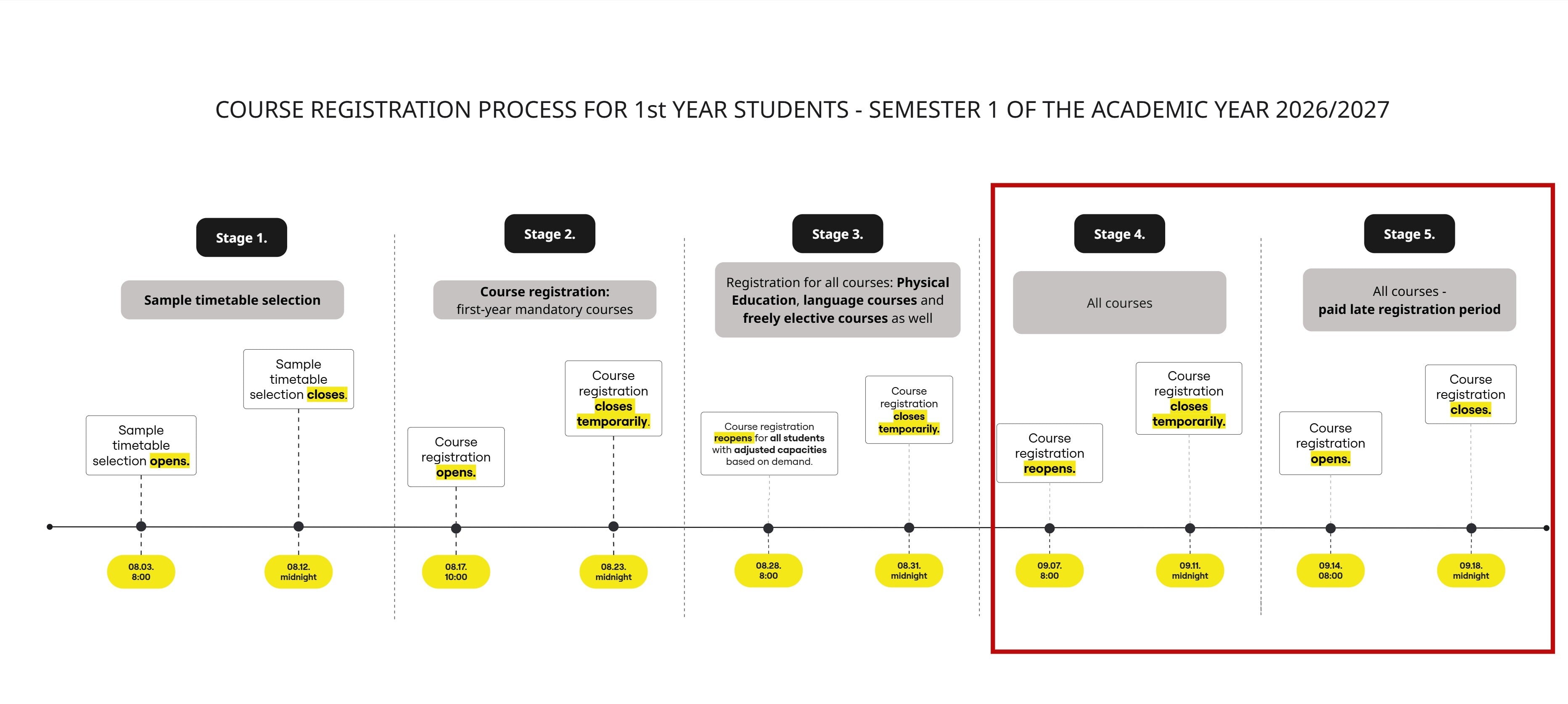
You may register for your courses from 8:00 a.m. on 7 September 2026 until 11:59 p.m. on 11 September 2026.
If a course has reached its capacity but you would still like to register, you may submit a request for admission to the course by filing the „Request concerning course enrolment” form. This request can be submitted free of charge in the Neptun between 8:00 a.m. on 7 September 2026 and 11:59 p.m. on 11 September 2026. During the next phase of the course registration period, the same request may be submitted subject to a fee between 8:00 a.m. on 14 September 2026 and 11:59 p.m. on 18 September 2026.
The schedule for course registration for the 2026/2027/1 semester is shown in the figure below.
A detailed description of the course registration schedule for the 2026/2027/1 semester is available HERE .
.